Design the Life You're Built For
A Self-Report Guide to the Archetiq Platform
First Edition · October 2026 e-ISBN: 978-967-1784-45-7 Author and rights holder: Ts. Dr. Sivabalan Vellasamy (Ed D) Publisher: Mind Meditate Resources, H-07-03, Blok H, Pusat Komersial Dataran Ecohill, Jalan Ecohill 1/2, Semenyih, 43500 Selangor, Malaysia Contact: support@archetiq.com Live product: https://www.archetiq.com
Edition note: This is a fixed publication edition describing selected Archetiq modules as of October 2026. The live platform may change independently. The in-app guide is a separate, changeable product experience and is not represented as identical to this deposited edition.
Front Matter
Copyright
© 2026 Ts. Dr. Sivabalan Vellasamy. All rights reserved. Published by Mind Meditate Resources.
No part of this publication may be reproduced, stored in a retrieval system, or transmitted in any form or by any means, whether electronic, mechanical, photocopying, recording, or otherwise, without prior written permission from the rights holder, except as permitted by applicable law.
This work is intended to be filed for copyright notice with the Intellectual Property Corporation of Malaysia (MyIPO) under the Copyright Act 1987. Copyright protection arises automatically upon creation of an eligible work; voluntary notification is a public-record tool and is not a registration of ownership. This notice does not constitute legal advice.
Audience and scope
This book is written for three audiences that the Archetiq platform serves:
- Individuals seeking to understand their personality patterns and turn them into a weekly practice.
- Students who use the optional Learning Strengths reflection as a separate self-report module.
- Organisation leaders, team members, and founders who use the platform's team-intelligence and founder-journey tools.
It walks through selected live modules, what each one does, how to use it, and what it does not do. The edition date identifies the product snapshot described; it does not guarantee that every screen or route remains unchanged.
What this book does and does not claim
The Archetiq platform is a set of self-report tools, structured worksheets, and AI-assisted drafts built around three layers of identity (archetype, force, secondary), plus four pillars of weekly practice (Mind & Body, Career & Skills, Financial Freedom, My People).
- The platform measures self-reported tendencies, not abilities, IQ, fixed learning styles, or vocational suitability. The Learning Strengths module is informed by Howard Gardner's multiple intelligences framework, but the 43-item instrument is a self-report reflection, not a validated MI test.
- The wellness module uses the Archetiq labels Mover, Transformer, and Builder for self-reflection. This book does not claim that these labels are established Ayurvedic or Siddha categories, or that they describe validated physiology. The module is not a medical or diagnostic instrument.
- The platform's compatibility engine uses archetype mapping tables and weighted scoring. The score is a tendency indicator, not a prediction of relationship quality, hiring outcome, or therapy recommendation.
- All AI-assisted drafts (90-day plans, chemistry narratives, career fit analyses) can be incomplete or wrong. Review, edit, and accept them deliberately; nothing should be treated as established fact merely because the platform generated it. Before submitting personal or organisational details, read the current privacy notice and share only information you are authorized to provide.
The live app may show additional or updated notices. Read the current in-app notice and privacy information before using a module; this fixed edition cannot guarantee that its wording matches later releases.
How to use this book
You can read this book end-to-end as a reflection on identity, direction, and practice, or use the module chapters alongside the platform. Most module chapters use a common pattern:
- Purpose — what the module is for.
- Prerequisites — who can access it and what you need to do first.
- Inputs — what you enter.
- Output — what the platform shows, in plain language.
- Step-by-step walkthrough — the live flow.
- A short synthetic example — illustrative, not from a real account.
- Practical exercise — one action to try this week.
- Save, share, and review behaviour — what carries over, what stays local, what is exportable.
- Limitations and safety notes — what the module is not.
- Next module — where to go after this one.
Access and prerequisites map
This is a dated summary of the access policy, not a guarantee of current route behavior. The policy source was last dated 21 July 2026. Individual-plan access and organisation-role access are separate and may stack; organisation features can also be limited by role and team scope. Check the current in-app access notice before relying on an entitlement.
- Discovery and core results — Discovery (
/questionnaire) and My Report (/report) are available across account types. Learning Strengths (/learning-strengths) is an optional reflection after Discovery. Archetype Reveal (/archetype-reveal) presents the result. - Explorer modules — Book Guide (
/book), Mind & Body (/wellness-profile), Money Plan (/financial-plan), Career Path (/life-simulator), Growth Loop (/growth-loop), and personal Chemistry Check (/chemistry) require Explorer access. Career Path also requires Discovery and Money Plan. - StartupOS / Founder Journey — Organisation members can access their own StartupOS journey (
/startupand/startup/*). Team-lead and other role access to another member's workspace is scoped by the organisation policy. - Organisation tools — Organisation Dashboard (
/organisation), Teams (/team), Team Intelligence (/team-intelligence), and Team Maturity (/team-maturity) are role-dependent. A team member's own maturity view differs from aggregate or administrative views. - Coach and platform administration — Coach Portal (
/coach-portal) is for authorised coach roles. Admin Panel (/admin) is an internal platform-administration route.
Contents
- The Archetiq Identity System
- The 47-Question Discovery Assessment
- Reading Your My Report
- Optional: Learning Strengths Reflection
- Mind & Body (Wellness Profile)
- Money Plan (Financial Plan)
- Career Path (Life Simulator)
- Growth Loop
- Chemistry Check (Personal Compatibility)
- Organisation Dashboard
- Team Workspace
- Team Intelligence
- Team Maturity
- Founder Journey
- Appendix A — Self-Directed Worksheets
- Appendix B — Score Notes and Glossary
- Appendix C — References and Credits
- Appendix D — MyIPO Submission Checklist
Chapter 1 — The Archetiq Identity System
1.1 What an archetype is
An archetype in this book is your default operating pattern — the way you tend to think, feel, and act when you are not consciously choosing. Everyone has access to all five archetypes, but one or two run in the background most of the time. That primary pattern is your archetype.
Archetypes are tendencies, not destinies. The same person can use any archetype when they choose to. The platform and this book describe defaults so you can name them, work with them, and stretch them deliberately.
1.2 The three layers
The Archetiq identity result has three layers. Read them in order: the first names the primary pattern, the second describes its pace or expression, and the third adds a supporting pattern. The layers work together, but they are not three independent diagnoses or measures of ability.
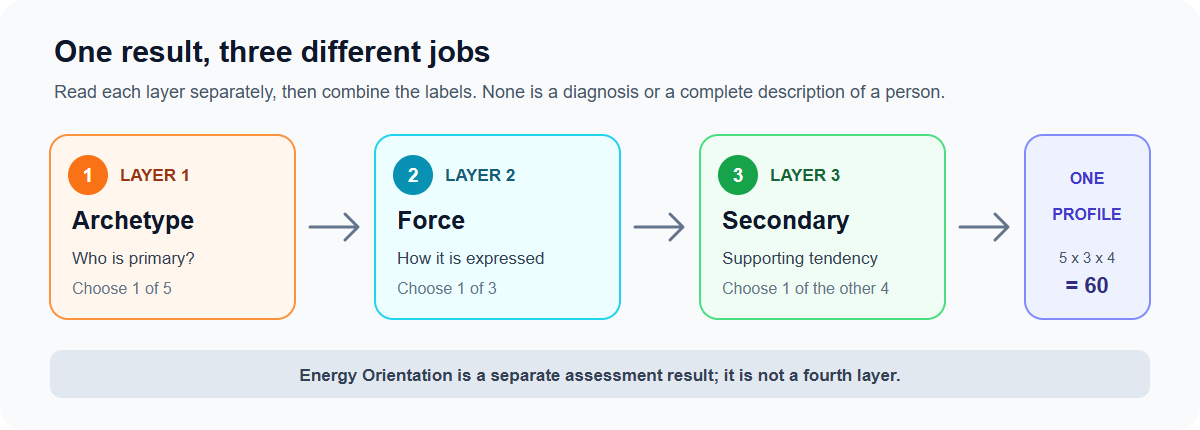
Figure 1. Read the layers in order. Energy Orientation is a separate result, not another layer.
Layer 1 — Archetype: your primary pattern. One of five options is identified as primary: Driver, Visionary, Integrator, Stabilizer, or Specialist. This layer is the starting point for the report's description of how you may tend to notice, decide, and act. It is a reflection label, not a fixed identity or a complete description of you.
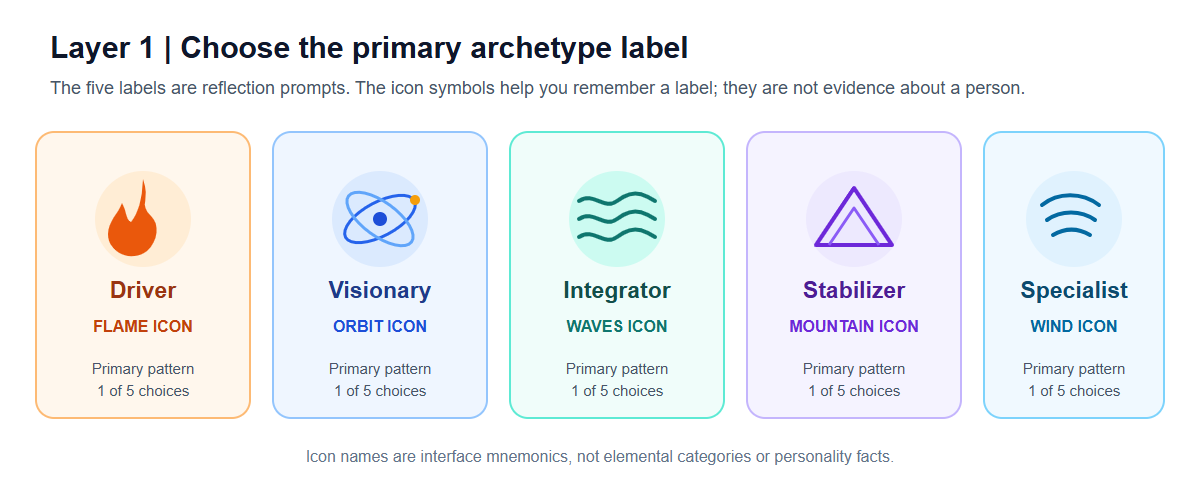
Figure 2. Layer 1 offers five primary labels. The icon names identify interface artwork only; they do not assign fire, space, water, earth, or air qualities to a person.
Layer 2 — Force: the expression or tempo. Flow, Catalyst, or Anchor describes the way the primary archetype is framed in the Archetiq system. The force changes the expression of Layer 1; it does not replace it. For example, a Driver remains a Driver whether the mapped force is Flow, Catalyst, or Anchor. Each archetype-force pairing has an established identity name and an animal cue, which are used as product labels and memory aids.
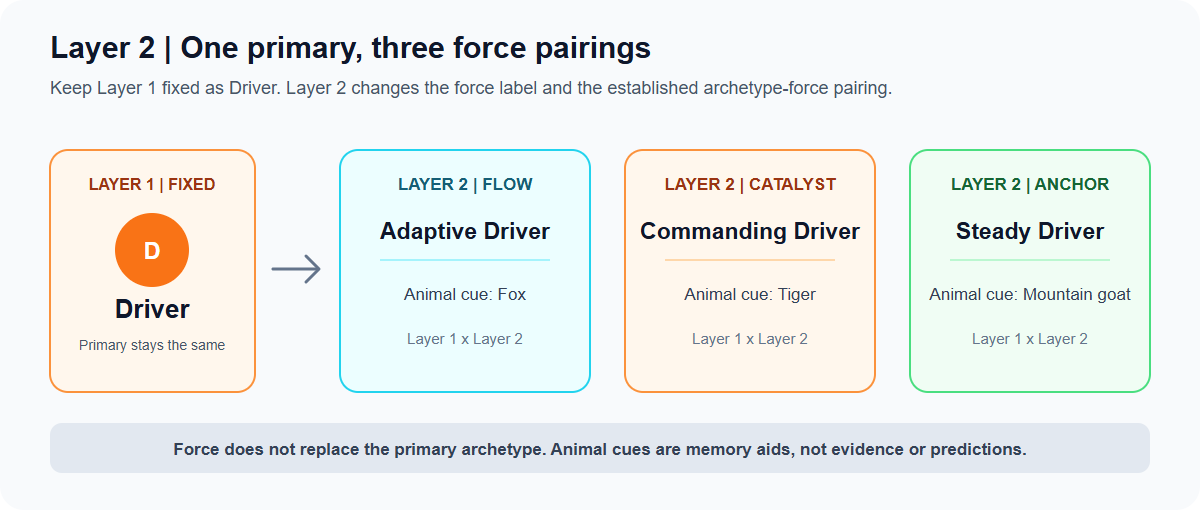
Figure 3. This example holds Layer 1 constant to show how Layer 2 changes the pairing. The animal cues are visual mnemonics, not predictions.
Layer 3 — Secondary archetype: a supporting tendency. The secondary is the next archetype in the assessment result, chosen from the four archetypes other than the primary. It adds another lens to the primary description. It does not cancel or replace Layer 1, and the exact blend should be read as a prompt in the report rather than a prediction of behavior.
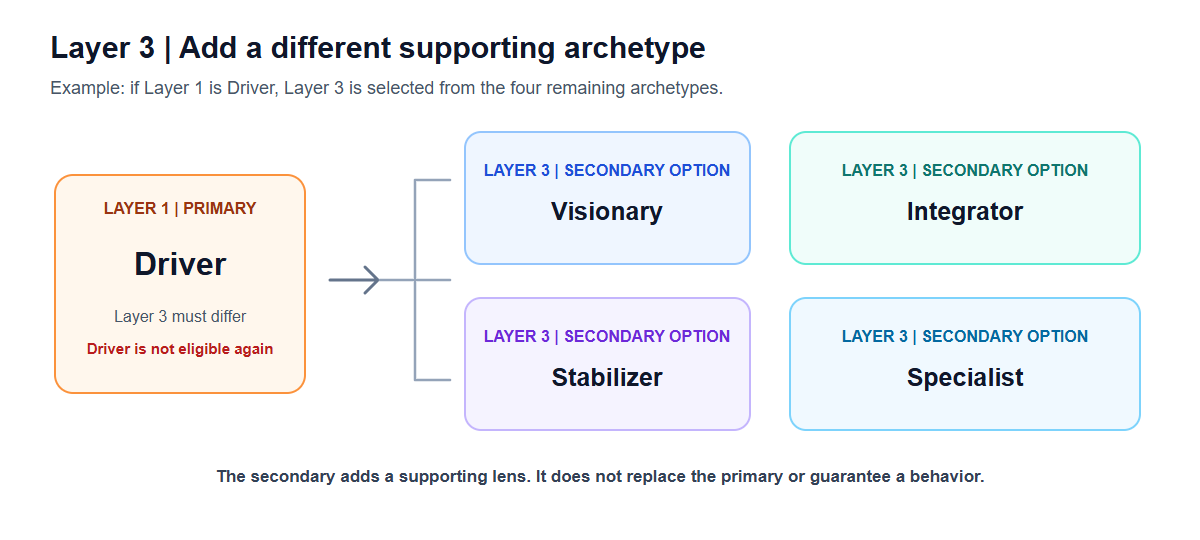
Figure 4. If Driver is primary, Layer 3 can be one of the other four archetypes. A secondary adds a supporting lens; it does not replace the primary.
How the combinations work. There are 5 choices for Layer 1, 3 for Layer 2, and 4 eligible choices for Layer 3 because the secondary is different from the primary. Therefore, the framework describes 5 × 3 × 4 = 60 possible three-layer signatures. Energy Orientation is reported separately and is not another choice in this count. A signature such as Visionary–Flow with Integrator secondary means: Visionary is the primary label, Flow is its expression label, and Integrator is the supporting tendency. It is one combination of prompts, not a guarantee about how someone will behave.
The assessment selects the primary and secondary from the relative archetype scores and derives the force using the platform's mapping. A profile may be labelled Strong, Balanced, or Hybrid depending on the score pattern. These labels describe the platform's result format; they do not measure a person's worth or potential.
1.3 Reading the icon, force, animal, and identity labels
The app uses an icon beside each Layer 1 archetype name and a small marker beside Layer 2 Force. These are interface symbols only. The framework does not assign literal-element meanings such as fire, space, water, earth, or air to a person's archetype. An animal cue and official identity name identify each Layer 1 × Layer 2 pairing; neither encodes Layer 3.
Layer 1 — Archetype and core energy
The five core energies and descriptions below follow the Book Guide. They are brief summaries of the labels, not scores or fixed traits.
| Layer 1 archetype | Core energy | Essence | Interface icon cue |
|---|---|---|---|
| Driver | Action | Decisive, focused, outcome-driven | Flame icon |
| Visionary | Imagination | Ideation, possibility, big-picture | Orbit icon |
| Integrator | Connection | Empathy, cohesion, relational trust | Waves icon |
| Stabilizer | Structure | Reliability, systems, consistency | Mountain icon |
| Specialist | Mastery | Depth, precision, expert knowledge | Wind icon |
Layer 2 — Force
Force describes a mode of expression in the Archetiq model. The pattern names, felt experience, and watch-outs below follow the Book Guide. The app markers are an arrow for Flow, a lightning mark for Catalyst, and an anchor for Anchor.
| Layer 2 force | Pattern | How it may feel | Watch-out |
|---|---|---|---|
| Flow | Exploratory momentum | Curious, open, sustained | Can drift or be slow to decide |
| Catalyst | Activation energy | Quick, decisive, igniting | Can burn out or skip depth |
| Anchor | Long-horizon reliability | Steady, consistent, rooted | Can resist change or move slowly |
All 15 Layer 1 × Layer 2 identity pairings
These three narrow tables list every primary archetype combined with each Force. Each row gives the Layer 1 core energy and icon cue, plus the official Layer 1 × Layer 2 identity name and its animal memory cue. Cue phrases repeat the Book Guide's short descriptions; they are not claims about literal animal behavior or predictions about a person.
Flow pairings
| Layer 1 primary | Official identity and animal cue |
|---|---|
| Driver (Action; Flame icon) | Adaptive Driver — Fox: adapts its route |
| Visionary (Imagination; Orbit icon) | Explorer Visionary — Butterfly: explores change |
| Integrator (Connection; Waves icon) | Expressive Integrator — Dolphin: connects and communicates |
| Stabilizer (Structure; Mountain icon) | Flexible Stabilizer — Squirrel: adapts resourcefully |
| Specialist (Mastery; Wind icon) | Innovative Specialist — Owl: observes carefully |
Catalyst pairings
| Layer 1 primary | Official identity and animal cue |
|---|---|
| Driver (Action; Flame icon) | Commanding Driver — Tiger: acts decisively |
| Visionary (Imagination; Orbit icon) | Strategic Visionary — Hummingbird: energizes ideas |
| Integrator (Connection; Waves icon) | Activating Integrator — Meerkat: alerts and mobilizes the group |
| Stabilizer (Structure; Mountain icon) | Operational Stabilizer — Horse: executes dependably |
| Specialist (Mastery; Wind icon) | Applied Specialist — Bee: applies skills precisely |
Anchor pairings
| Layer 1 primary | Official identity and animal cue |
|---|---|
| Driver (Action; Flame icon) | Steady Driver — Mountain goat: keeps climbing |
| Visionary (Imagination; Orbit icon) | Grounded Visionary — Elephant: thinks long term |
| Integrator (Connection; Waves icon) | Harmonizing Integrator — Penguin: builds steady community bonds |
| Stabilizer (Structure; Mountain icon) | Foundational Stabilizer — Beaver: builds lasting systems |
| Specialist (Mastery; Wind icon) | Master Specialist — Tortoise: masters with patience |
Layer 3 — Eligible secondary archetypes
Layer 3 is the secondary archetype. It must be different from the Layer 1 primary. For each primary, the four eligible choices are:
| Layer 1 primary | Layer 3 secondary choices |
|---|---|
| Driver | Visionary, Integrator, Stabilizer, Specialist |
| Visionary | Driver, Integrator, Stabilizer, Specialist |
| Integrator | Driver, Visionary, Stabilizer, Specialist |
| Stabilizer | Driver, Visionary, Integrator, Specialist |
| Specialist | Driver, Visionary, Integrator, Stabilizer |
For example, Driver + Catalyst + Integrator secondary means Layer 1 Driver, Layer 2 Catalyst, and Layer 3 Integrator. Its Layer 1 × Layer 2 identity is Commanding Driver, with Tiger — “acts decisively” — as the pairing cue. Commanding Driver does not include or replace the Layer 3 result. The matrix contains 15 Layer 1 × Layer 2 pairings; four eligible Layer 3 choices for each produce 60 three-layer signatures. Energy Orientation is reported separately.
1.4 What the platform does and does not measure
The platform measures self-reported tendencies. It is not a clinical, psychometric, or diagnostic tool. It is a structured reflection and planning aid.
Chapter 2 — The 47-Question Discovery Assessment
2.1 Purpose
The Discovery assessment produces the three layers of your identity: archetype, force, and secondary. It also gives an energy orientation (Extrovert, Introvert, or Balanced).
2.2 Prerequisites
- A registered account on https://www.archetiq.com.
- No other prerequisite. Discovery is open to every plan, including the free tier.
2.3 Inputs
The assessment is a single page of 47 self-report items. You answer on a 5-point Likert scale from Strongly Disagree to Strongly Agree. The instrument mixes questions across all five archetype sub-scales and an Extrovert/Introvert axis; some items are reverse-scored so that agreeing with the same idea in different phrasings increases the relevant scale. The platform does not identify which item belongs to which scale. Answer according to your typical behavior rather than an idealized self-image; this book makes no claim that faster or first-instinct responses are more accurate.
2.4 Output
When you finish, the platform returns:
- Primary archetype (highest average sub-scale score).
- Secondary archetype (second highest).
- Force (derived from the primary × secondary pairing using the framework's mapping; see Appendix B).
- Energy orientation — Extrovert, Introvert, or Balanced. A neutral band prevents a coin-flip on near-equal scores.
- Profile type — Strong, Balanced, or Hybrid (based on the gap between the top two archetype averages).
The platform does not report a "Profile Confidence" percentage in the main report. The gap between top-two sub-scales is the underlying signal; the archetype and force are the useful labels.
2.5 Step-by-step walkthrough
- Open https://www.archetiq.com/questionnaire.
- Read the brief introduction. You can stop and resume later; your answers are saved as you go.
- Answer the 47 items based on your typical behavior rather than how you wish you behaved. Take the time you need to read each statement.
- Submit. The platform computes your archetype, force, secondary, energy orientation, and profile type.
- The result is stored on your user record under the
responsescollection and your profile.
2.6 A short synthetic example
Mira, age 31, answered the 47 items in nine minutes. Her highest sub-scale was Integrator (mean 4.4) and her second was Visionary (3.9). Her Extrovert average was 4.5 and Introvert 3.1, a 1.4 gap. Her primary archetype is Integrator, secondary Visionary, force Activating Integrator, energy orientation Extrovert, profile type Balanced.
2.7 Practical exercise
Set a clean context. Find 15 uninterrupted minutes. Think about a specific week in the last three months when you were operating normally — not at your best, not in crisis. After completing the assessment, write down your first reaction to the result: surprise, recognition, or resistance. All three tell you something.
2.8 Save, share, and review
Your result is saved automatically and persists across devices. It is available in My Report and the Archetype Reveal. The platform offers a public share link you can give to a coach, mentor, or team colleague. Share only with people you trust, and revoke a link from your profile page when you no longer want it active.
2.9 Limitations and safety
The Discovery assessment is a self-report tool. It does not diagnose mental health conditions, learning disabilities, or neurological differences. It does not replace therapy, clinical assessment, or professional career counselling. The framework is a structured reflection aid, not a measure of ability, intelligence, or worth.
2.10 Next module
After Discovery, open My Report to see how the three layers are presented as a working blueprint.
Chapter 3 — Reading Your My Report
3.1 Purpose
My Report turns the three layers of your identity into a working blueprint: who you are, how you work, how you grow, and where you are heading.
3.2 Prerequisites
- A completed Discovery assessment. The report requires your archetype, force, secondary, and energy orientation.
3.3 Inputs
The report is generated from your saved Discovery result, your saved user profile (name, age, education, occupation), and your chosen locale. If you want the report to reflect more of your context, complete your profile first.
3.4 Output
The report exposes seven named sections in the in-app navigation: Identity, Superpowers, Secondary Side, Blind Spots, Learning Mode, Career & Team, and Growth Plan. Each section is exported to PDF as its own block.
Each section is a short, plain-language interpretation of your saved data:
- Identity — your archetype, force, secondary, energy orientation, archetype icon, and Layer 1 × Layer 2 animal cue.
- Superpowers — the natural strengths that show up when you are at your best.
- Secondary Side — how your supporting archetype shapes the primary.
- Blind Spots — the patterns that trip you up under pressure.
- Learning Mode — a tendency, not a learning-style label, drawn from your archetype profile.
- Career & Team — your personalized sector exploration and work-style options (see Chapter 7).
- Growth Plan — a four-week starter plan built from your pattern.
3.5 Step-by-step walkthrough
- Open https://www.archetiq.com/report.
- Read the Identity section first. Confirm the archetype and force match your lived experience.
- Move to Superpowers and Blind Spots. Both are interpretations; treat them as prompts, not verdicts.
- The Career & Team section shows a small number of sector starting points. Each one explains the reason it appears (archetype theme, education field, occupation field).
- The Career & Team section also includes a link to the full 22-sector reference on the Career Path page. The full sector list is a browse-only reference; selecting a sector there does not save a preference and is not sent to the Career Path AI.
- Use Export PDF or Print to save the report. The PDF preserves the seven sections and the read-only legacy content beneath them.
3.6 A short synthetic example
Arif, an Integrator-Catalyst, sees the Career & Team section recommend three sector starting points: Business, Marketing & HR (his archetype theme), Education & Training (his secondary), and Hospitality (his education clue "Diploma in Hospitality"). Below those, the Work Styles block highlights freelance and consulting as a starting prompt for his Catalyst force, alongside corporate and portfolio routes. He is not told which one is "best for him" — he is invited to read each route and try a small action.
3.7 Practical exercise
Read the full report. Write down:
- One thing you already knew about yourself that the report confirmed.
- One thing the report said that you initially resisted — and whether it was accurate on reflection.
- One section that felt most urgently relevant to where you are right now.
3.8 Save, share, and review
The report is regenerated whenever your underlying result changes. If you retake the assessment, your report updates to the latest result. Share links are public-by-token; revoke any you no longer want active.
3.9 Limitations and safety
The report is interpretive. None of the seven sections is a measurement of intelligence, leadership potential, or relationship quality. Compatibility, sector, and growth prompts are starting points that you accept or reject.
3.10 Next module
After the report, the optional Learning Strengths reflection (Chapter 4) is a separate, non-scored module you can use to reflect on study, work, and focus preferences.
Chapter 4 — Optional: Learning Strengths Reflection
4.1 Purpose
The Learning Strengths reflection is a separate, optional self-report module. It is not part of the Discovery assessment, does not change your archetype, and is not used to score or grade you. It is a structured prompt for thinking about the activities you enjoy, the study approaches that work for you, and the conditions that help you focus.
4.2 Prerequisites
- A completed Discovery assessment. After Discovery, the module becomes available in the Discovery sidebar.
4.3 Inputs
The reflection has 43 items, answered on the same 1–5 scale as Discovery. There are four sections:
- Eight areas of interest (32 items, four per area) — Words & stories, Patterns & puzzles, Images & design, Rhythm & sound, Making & movement, People & teamwork, Reflection & goals, Nature & living things.
- What draws you in (3 items) — Exploring questions, A good challenge, Real-life connections.
- Ways to explore ideas (4 items) — Worked examples, Active practice, Talk it through, Your own notes.
- Conditions that help you focus (4 items) — Quiet space, Learning with others, Clear steps, Room to choose.
4.4 Output
The platform computes the average rating for each of the 19 sub-scales (8 interest areas + 3 engagement + 4 study strategies + 4 focus conditions) on the 1–5 scale. It also shows:
- Your top three areas to explore — a compact summary of your three highest-rated interest areas.
- A categorized career map for all eight areas — for every interest area, you get a sector category list, example roles, a possible pathway, a learning action, and a practical experiment. Where scores are tied, the tied areas are listed together.
- Engagement, study, and focus clues — one highest-rated item per section, used to personalize suggestions.
4.5 Step-by-step walkthrough
- Open https://www.archetiq.com/learning-strengths.
- Read the short introduction. The module is a self-report reflection, not a test.
- Answer the 43 items. Use the "Not like me" to "Very like me" labels.
- Submit. The platform computes your 19 sub-scales, displays the top three areas, and shows the categorized career map below.
- Use Retake if you want to repeat the reflection. Use About this reflection to see how the questions are organized.
4.6 A short synthetic example
Sanjay's top three areas are Words & stories (4.5), Patterns & puzzles (4.0), and Images & design (3.8). His categorized map shows Words & stories pointing to Media, Communications & PR, Education & Training, and Business, Marketing & HR, with example roles like writer or editor, communications specialist, and possible pathway "writing or communications assistant -> specialist -> editor, communications lead or independent practitioner." His practical experiment is "write a short article or interview someone and share their story."
4.7 Practical exercise
Pick the top area and try the practical experiment listed in its card. If two areas tie, run both experiments. Spend 30 minutes on each and note what you actually enjoyed versus what you expected to enjoy.
4.8 Save, share, and review
Your result is saved to your profile under learningStrengths and is also cached locally so you can review it on the same device. The platform offers draft recovery: if you start the reflection and leave, your in-progress answers are kept locally and you can resume. Sync to your account happens when you submit. The result is private to your account; it is not used to populate any other module automatically.
4.9 Limitations and safety
Learning Strengths is a self-report reflection. It is not a measure of intelligence, a validated MI test, a fixed learning style, or a career-fit score. Sector examples in the career map are browsing prompts, not measured suitability. Tied scores are equally relevant; the "top three" are starting examples, not exclusive winners.
4.10 Next module
When you are ready to ground the reflection in the body, the next module is Mind & Body (Chapter 5). You can also use the worksheets in Appendix A while you decide.
Chapter 5 — Mind & Body (Wellness Profile)
5.1 Purpose
Mind & Body is a self-report reflection on the energy, sleep, dietary, and routine patterns you already have. The platform reflects on your answers, groups them into a single Wellness Energy Type label (Mover, Transformer, or Builder), and shows practical suggestions in four sections: Snapshot, Playbook, Daily Reset, and Challenge.
5.2 Prerequisites
- Discovery completed.
- Explorer plan (or organisation access).
5.3 Inputs
The reflection is a short questionnaire of self-report items. The platform derives your Wellness Energy Type from your answers. The Archetiq 3-Layer Identity System and your wellness reflection are separate: archetype describes a psychological pattern; the wellness reflection describes a physical-energy pattern. The platform does not diagnose medical conditions.
5.4 Output
- Snapshot — a one-screen view of your current energy type, plus a small set of suggested habits.
- Playbook — a small set of archetype-aligned practice suggestions.
- Daily Reset — a short routine aligned to your wellness type.
- Challenge — a 7-day challenge, with a one-tap "Add to Growth Loop" action that seeds all seven days as goals you can check off daily.
5.5 Step-by-step walkthrough
- Open https://www.archetiq.com/wellness-profile.
- Complete the short quiz. Use the "Not like me" to "Very like me" labels.
- Read the Snapshot for an overview of your wellness type and suggested habits.
- Open the Playbook for a small set of archetype-aligned practices.
- Use the Daily Reset as a short routine aligned to your wellness type.
- Tap Track 7-Day Challenge in Growth Loop to add the challenge to your Growth Loop daily stack. The button disappears once the goals are seeded.
5.6 A short synthetic example
Rina, an Anchor-force Stabilizer, completes the quiz and sees a Builder-dominant reflection. Her Daily Reset suggests a 20-minute morning movement block. She taps the Challenge button; the seven day-cards are added to her Growth Loop health pillar with a status of "not started" so she can tick them off one at a time.
5.7 Practical exercise
For one week, note your energy at three points each day: morning, after lunch, and evening. Rate each 1–5. After seven days, identify your peak energy window and your consistent low point. Schedule demanding work into your peak window and admin/recovery into your low point.
5.8 Save, share, and review
Your wellness reflection is saved to your profile under wellnessProfile. The 7-Day Challenge, when added, becomes part of your Growth Loop goals. Updates from Growth Loop statuses flow back into the platform.
5.9 Limitations and safety
Mind & Body is a self-report reflection using Archetiq-created labels. It is not a medical, physiological, or diagnostic instrument. The platform does not provide medical advice. If you have a medical condition, are pregnant, are taking medication, or have a specific physical concern, consult a qualified healthcare professional before adopting any of the suggested practices.
5.10 Next module
Once your wellness pattern is recorded, the next module is Money Plan (Chapter 6).
Chapter 6 — Money Plan (Financial Plan)
6.1 Purpose
Money Plan is a three-step reflection on your financial personality, your cashflow, and your financial health. It produces a 0–100 health score, a pillar breakdown, and a small set of archetype-aligned habits.
6.2 Prerequisites
- Discovery completed.
- Explorer plan (or organisation access).
6.3 Inputs
Step 1 — My Money Style is auto-derived from your archetype. You read the suggested Needs / Wants / Savings & Investing split, your archetype-specific strengths and blind spots, and the characteristic financial shadow.
Step 2 — My Money Picture is where you enter your real numbers:
- Income — salary, freelance, rental, dividends, side hustle, and any other monthly income.
- Investments — assets you hold, with monthly contribution amounts.
- Expenses — housing, transport, food, subscriptions, insurance, tax, and any other recurring expenses.
- Liabilities — personal and study loans.
- Property & Financed Assets — financed assets are tracked separately with market value, loan balance, monthly instalment, rental income, and itemised property bills. This separation prevents double counting.
Step 3 — Score & Path computes the Financial Health Score (0–100) across four pillars:
- Savings Rate — what you are putting aside relative to income.
- Debt Load — total debt payments as a percentage of income.
- Emergency Fund — months of expenses covered by liquid savings.
- Investing — whether any regular investing is happening at all.
6.4 Output
Each pillar card shows a metric in plain language (for example, a percentage of income or months of expense coverage). The interface may use colors to show its internal thresholds; these colors and the overall score are product feedback, not a clinical or independently validated financial rating. Below the pillars, the platform may show archetype-related prompts and life-stage guidance. Treat them as optional reflection prompts, not as personalized financial advice.
6.5 Step-by-step walkthrough
- Open https://www.archetiq.com/financial-plan.
- Read My Money Style and notice what resonates and what you have been avoiding.
- Open My Money Picture and enter your real numbers. Use one month of data; the platform stores your last saved snapshot.
- The live cashflow bar updates as you enter. The four-bucket summary breaks down each bucket as a percentage of income. Each bucket tile is expandable.
- Move to Score & Path and review the four pillar metrics and the overall score.
- Read the archetype-specific habits. Pick one to try this week.
- Save. The plan writes to your profile under
financialPlan.
6.6 A short synthetic example
David enters RM 8,000 monthly income, RM 4,800 in living expenses, RM 720 in debt payments, RM 1,360 in savings contributions, and no investment contribution. The entries leave RM 1,120 unallocated. He also records an emergency fund equal to about 2.1 months of expenses. These are illustrative entries, not a recommended budget or a promise of a particular score. If he records a financed property or vehicle in the dedicated financed-assets area, he checks the form labels so that the same loan balance, instalment, rental income, or bills are not counted twice.
6.7 Practical exercise
Before opening My Money Picture, write down:
- The money topic you have been avoiding most (savings, debt, investing, income ceiling).
- The last three "financial decisions" you delayed — and the emotion underneath the delay.
- One money habit that conflicts with what you say you value.
Bring these into the plan. The tool works best when you do not sanitise your inputs.
6.8 Save, share, and review
The plan is saved to your profile. You can update any field at any time; the platform preserves the history of saved snapshots. The plan is private to your account.
6.9 Limitations and safety
The plan is a self-report reflection, not regulated financial advice. It does not consider tax rules, jurisdiction-specific retirement schemes, insurance regulations, or your full personal situation. The score is a tendency indicator based on the four pillar metrics you enter. For specific decisions (debt restructuring, insurance, investments, tax), consult a qualified financial professional licensed in your jurisdiction.
6.10 Next module
The Money Plan is also a prerequisite for Career Path (Chapter 7), which reads selected financial context to personalise the AI Career Fit draft.
Chapter 7 — Career Path (Life Simulator)
7.1 Purpose
Career Path is a structured career exploration workspace. It combines your Identity result, your profile, your financial context, your interests, your Ikigai-style reflection, and your stated intention into an AI-assisted career fit draft and a personalised set of sector examples.
7.2 Prerequisites
- Discovery completed.
- Money Plan completed (or in progress).
- Explorer plan (or organisation access).
7.3 Inputs
Career Path is a multi-section workflow:
- About You — your archetype, force, secondary, energy orientation, age, occupation, education, and skills. The platform pre-fills from your profile.
- Your Direction — your intention (for example, choose a course, find a career, advance, change direction, improve leadership, or improve team communication), preferred paths (Acceleration, Mastery, Contribution), chosen role (or a custom role), and free-text notes.
- AI Career Advisor — a free-text input where you can ask age- and finance-aware questions before the analysis runs.
The platform also accepts an optional Ikigai-style four-circle reflection (what you love, what you are good at, what the world needs, what you can be paid for) and up to two stated constraints. The reflection is stored locally; the constraints are passed to the AI.
7.4 Output
Career Path produces:
- A role-by-role fit analysis with a verdict and score for each suggested role.
- A best role recommendation when the AI identifies one.
- A 22-sector reference catalogue. The catalogue is browse-only on this page: selecting a sector does not save a preference, and selection is not sent to the AI. The full catalogue exists so you can compare sectors outside the four starting points.
- A work-style lens: corporate ladder, freelance and consulting, and portfolio career. The platform surfaces a starting prompt based on your Layer 2 force.
7.5 Step-by-step walkthrough
- Open https://www.archetiq.com/life-simulator.
- Review About You. Update any profile details you want the AI to see.
- In Your Direction, choose your intention, preferred paths, and chosen role (or a custom role).
- Optionally use AI Career Advisor to ask a contextual question before running the analysis.
- Run the analysis. The platform shows a role-by-role verdict and a best role recommendation.
- Open the 22 sectors reference to compare options. Selecting a sector only changes what is displayed; it does not save a preference or feed the AI.
- Read the work-style options. Compare corporate, freelance, and portfolio routes and pick one to try as a small experiment.
- Commit to a path. Your committed path is written to your profile and is the anchor for the Growth Loop master plan.
7.6 A short synthetic example
Hafiz is a Visionary-Flow with secondary Specialist. He sets an intention of "Find a suitable career," prefers the Mastery and Contribution paths, and chooses "UX designer." The analysis shows him a list of roles, each with a verdict and a small score. The 22-sector reference shows Technology & IT, Creative, Arts & Design, and Education as adjacent. The work-style lens offers freelance and consulting as a starting prompt for his Flow force. He commits to Mastery and tracks his chosen role on the Growth Loop.
7.7 Practical exercise
Pick two sectors from the 22-sector reference that you have not worked in. Spend 15 minutes on each, listing one realistic entry role, one qualification or licensing requirement, and one thing you could try this month (a course, a conversation, a small project). Do not commit to either sector yet.
7.8 Save, share, and review
Your committed path is saved to your profile. The chosen role, the role verdicts, and the AI narrative are saved so you can review them later. The catalogue selection is local state and is not persisted.
7.9 Limitations and safety
Career Path produces a draft based on your inputs. The role verdicts and best role recommendation are starting points, not validated career recommendations. Some roles require specific qualifications, licensing, or accreditation that the platform does not verify. Only submit information you are authorized to provide and comfortable sharing under the current privacy notice; AI-generated content may be incomplete or wrong. For specific career decisions, especially regulated professions, consult a qualified career adviser or licensing body in your jurisdiction.
7.10 Next module
After you commit to a path, the next module is Growth Loop (Chapter 8), where your path anchors a four-pillar weekly practice.
Chapter 8 — Growth Loop
8.1 Purpose
Growth Loop turns the plans from Career Path, Mind & Body, and Money Plan into a daily and weekly practice. It is the engine where insight becomes action.
8.2 Prerequisites
- Discovery completed.
- Explorer plan (or organisation access).
- A committed Career Path is recommended but not required; the platform works with manual goals too.
8.3 Inputs
The Growth Loop is the home of your active goals across four pillars:
- Mind & Body — health, energy, sleep, movement, stress, nutrition.
- Career & Skills — professional direction and capability.
- Financial Freedom — money and wealth-building.
- My People — relationships and contribution.
Each goal has a title, a pillar, a status (Not started, In progress, Done), an optional target date, and a source indicating where it came from (manual, masterPlan, career, or legacy).
8.4 Output
The Growth Loop has two tabs and an above-the-tab AI Plan section.
AI Plan (above the tab bar) is shown when you have Wellness or Financial data on file and no master plan yet. The CTA is "Build My 90-Day Plan." When you accept, the goals are written to your Goals list with a masterPlan source. The previous master plan goals are removed to avoid duplicates. You can edit, remove, or reorder goals in the review before accepting.
Today tab is the daily anchor. It shows:
- A Daily Stack with one card per active pillar. Each card shows the first goal in that pillar. Tap the card to mark the pillar done for the day.
- A streak counter that increments when at least three pillars are checked on consecutive days.
- A Life Score computed from streak, 7-day habit completion, and your Weekly Pulse.
- A Daily Archetype Insight rotated by day of year, with a tip drawn from your archetype profile.
- A Weekly Pulse modal that appears on Sundays if you have not yet submitted a pulse for the current ISO week. The pulse has four sliders (0–10) for each pillar.
Goals tab is the single source of truth for your active goals. It groups goals by pillar, lets you add a manual goal, and lets you cycle a goal's status. The badge "X of Y goals done" shows overall progress.
8.5 Step-by-step walkthrough
- Open https://www.archetiq.com/growth-loop.
- If the AI Plan banner is visible, click Build My 90-Day Plan to generate a plan from your Wellness, Financial, and Career data. Review the goals, remove any you do not want, and accept.
- Move to the Today tab. Tap each Daily Stack card to mark today's pillars as done.
- Open the Goals tab to add manual goals, change a status, or delete a manual or master plan goal.
- On Sundays, complete the Weekly Pulse to feed the Life Score.
8.6 A short synthetic example
Nadia, an Explorer-Anchor, has 12 goals across her four pillars. Today, she marks Mind & Body and Career & Skills done. Her Daily Stack shows two of four. Her streak is 4 days. On Sunday, she rates each pillar 8, 7, 6, 8; the Life Score updates to 74. Her AI Plan is two weeks old; she clicks "Rebuild plan" to refresh the goals.
8.7 Practical exercise
Set a daily alarm for the same time each morning to open the Today tab and check off your Daily Stack. On Sundays, complete the Weekly Pulse before you start your week. The Growth Loop rewards consistency, not perfection.
8.8 Save, share, and review
All Growth Loop state is saved to your profile under growthLoop. The AI Plan is a saved snapshot with a generation timestamp. You can rebuild it at any time, but doing so replaces the previous plan goals in your Goals list.
8.9 Limitations and safety
Growth Loop is a self-management tool. It does not provide medical, mental health, or financial advice. Streak and Life Score are engagement metrics, not wellbeing measures. If a goal becomes distressing, set its status to "Not started" and consider speaking to a qualified professional.
8.10 Next module
After you have an active goal set, the next module is Chemistry Check (Chapter 9), which uses your Identity result to interpret how you connect with one or more other people.
Chapter 9 — Chemistry Check (Personal Compatibility)
9.1 Purpose
Chemistry Check is the platform's personal compatibility reflection. It interprets how your archetype, force, and energy orientation connect with one or more other people, based on shared profile data.
9.2 Prerequisites
- Discovery completed.
- Explorer plan. (Organisation members use Work Chemistry in Team Intelligence instead.)
9.3 Inputs
The platform reads:
- Your own profile (archetype, secondary, force, energy orientation, current status, area of interest, selected career path, life wheel scores, focus zones, strategic habits, vision, mission, share token).
- One to four other people, added by shared profile link (or full URL containing
/share/<token>). You do not type their archetype; the platform resolves it from their shared profile. - A relationship context — friend, life partner, family, team member, or business partner. The compatibility engine uses a different dimension weighting per context.
The platform supports pair comparison (you + one other person) and group comparison (you + two or more).
9.4 Output
The compatibility engine returns:
- A pair or group overall score (0–100). The score is a weighted sum of the dimensions for the selected relationship type. Weights always sum to 1.00 per type.
- Dimension scores — named axes (Energy Match, Openness to Experience, Values Alignment, and so on) with 0–100 scores and expandable notes. Thresholds are documented in Appendix B.
- Green flags — what works naturally in the pairing.
- Watch areas — predictable friction.
- Collaboration tips, dos, and don'ts.
- An archetype pair insight paragraph for the specific pairing.
- An approach guide — a set of short rules for first contact, framing requests, and handling disagreement.
- For you, personally — one paragraph of advice and a single growth edge.
9.5 Step-by-step walkthrough
- Open https://www.archetiq.com/chemistry.
- Copy your share link from the top of the page (or generate one from your profile if you have not yet).
- With each person's clear permission, add up to four people by pasting their share link or token into a slot. The platform resolves the link automatically.
- Choose a relationship context.
- Run the analysis. The platform returns the dimension scores, the green flags, the watch areas, the dos and don'ts, and the personal advice.
- Read the friction points section before reading the score. The score is one number; the friction points are where the work is.
9.6 A short synthetic example
Anika (Integrator-Anchor) and Reza (Driver-Flow) compare. Reza sends Anika his share link. The platform resolves his archetype from his profile. They select "team member." The dimension scores are Work Orientation 68, Work Style 52, Decision Making 41, Drive & Pace 71. The overall score is 58. Green flags include shared work orientation; watch areas include decision-making style. Dos: "give Anika the why before the how." Don'ts: "do not skip her pre-meeting agenda." Personal advice: "Reza should make space for the team's thinking pace; Anika should make space for Reza's action-first instinct."
9.7 Practical exercise
Run the Chemistry Check on one relationship you have never fully understood. Read the friction points before reading the score. The size of the friction is not a verdict on the relationship; the dimension scores describe where active management is needed.
9.8 Save, share, and review
Your share link is stored on your profile and can be revoked. The compatibility result is computed in your session; the platform does not persist a single canonical record of a pair unless you save it explicitly. Treat a share link as private access information and do not post it publicly.
9.9 Limitations and safety
The compatibility score is a platform-generated reflection, based on archetype mappings and weighted dimensions. It is not a prediction of relationship quality, hiring outcome, or therapy recommendation, and its numerical bands are not validated thresholds. Before entering another person's share link, obtain their clear permission for this analysis. Treat their link and results as private, use them only for the agreed purpose, and ask them to review the current sharing controls. Do not use the output as a hiring, disciplinary, or other consequential decision tool.
9.10 Next module
Personal Chemistry Check is the final individual module. Organisation and team modules follow in Chapters 10–14. Founders and coaches continue with Chapter 14 (Founder Journey).
Chapter 10 — Organisation Dashboard
10.1 Purpose
The Organisation Dashboard is the home of your organisation workspace. It is where Org Admin, HR Admin, and organisation members manage the team, billing, members, and access to organisation tools.
10.2 Prerequisites
- Organisation plan (or coach role with organisation access).
10.3 Inputs and output
The dashboard shows the current organisation, its members, its teams, and the active plan. Org Admin can add or remove members, change member roles, and manage organisation billing.
The dashboard is the entry point to:
- Team Workspace (Chapter 11) — manage teams and their members.
- Team Intelligence (Chapter 12) — see archetypes, pair chemistry, and team narrative.
- Team Maturity (Chapter 13) — see maturity ratings and growth plans.
10.4 Step-by-step walkthrough
- Open https://www.archetiq.com/organisation.
- Confirm the organisation name and plan.
- Use Members to add, remove, or change roles.
- Use Teams to assign members to one or more teams.
- Open Team Intelligence to see archetype and chemistry insights.
10.5 Limitations and safety
Access to organisation information depends on the user's role and the platform's current access and privacy policies. Do not assume that information is confidential merely because it appears in an organisation workspace. Before entering or reviewing personal or team information, confirm who can access it and how it may be processed, including by AI-assisted features. Do not share personal data beyond the purpose and permissions established by your organisation.
10.6 Next module
Continue to Team Workspace (Chapter 11) to organise members into teams.
Chapter 11 — Team Workspace
11.1 Purpose
Team Workspace is where Organisation Admins group members into teams and review team-level data. Each team is a unit for analytics, chemistry, and maturity views.
11.2 Prerequisites
- Organisation access.
- Organisation Admin or HR Admin role to create, edit, or delete teams. Members can view teams they belong to.
11.3 Inputs
Team name, optional description, and a list of member UIDs.
11.4 Output
A list of teams with their members. Each team has a Team Intelligence view (Chapter 12) and a Team Maturity view (Chapter 13).
11.5 Step-by-step walkthrough
- Open Team Workspace from the Organisation Dashboard.
- Create a team. Add members.
- Open the team's view. Each member's archetype is auto-populated from their saved Identity result, if they have completed Discovery.
11.6 Limitations and safety
Teams are an organisational grouping, not a psychological grouping. The chemistry and intelligence views are based on members' self-reported archetypes. If a member has not completed Discovery, the team view shows them as "Profile pending."
11.7 Next module
Continue to Team Intelligence (Chapter 12) to see the team's archetype mix and chemistry.
Chapter 12 — Team Intelligence
12.1 Purpose
Team Intelligence is the manager-grade view of a team. It uses members' saved archetypes to produce per-person compatibility, team-wide chemistry, coverage gaps, and an AI Team Coach narrative.
12.2 Prerequisites
- Organisation access.
- A team with at least two members who have completed Discovery.
12.3 Inputs
Team Intelligence reads each member's archetype, secondary, force, and energy orientation from their saved Identity result. It also reads the focal-person selector (Self by default; can be switched to any other member).
12.4 Output
Team Intelligence shows:
- Per-person compatibility — for each member, a compatibility guide (rapport, influence, conflict, triggers, workflow, dos, don'ts, growth edge) for the direction (manager, peer, or report) you choose.
- Team chemistry — average score, overall label, collective strength, collective blind spot, and coverage gaps (archetypes missing from the team).
- Top pair (highest natural chemistry) and bottom pair (most friction). These are the most actionable numbers in the view.
- AI Team Coach — a one-off narrative and a live chat that may use team context supplied by the application.
12.5 Step-by-step walkthrough
- Open Team Intelligence from the Organisation Dashboard or a team's view.
- Pick the focal person (default: you).
- Add team members if not already added. Their archetypes are auto-populated.
- For each member, choose a direction (manager, peer, report) and read the compatibility guide.
- Read the team chemistry block. Look at top pair and bottom pair.
- Open the AI Team Coach for a narrative or a question.
12.6 A short synthetic example
Mei is a Driver-Anchor managing a 6-person team with two Drivers, one Integrator, two Specialists, and one Stabilizer. The team's average score is 62. The top pair is the two Drivers (91). The bottom pair is Mei and the Stabilizer (44). The narrative suggests Mei make space for the Stabilizer's working pace, and pair the two Drivers on the next stretch project.
12.7 Practical exercise
Map your three most important professional relationships in Team Intelligence. For each one: read the friction points, read the "bridge move," and try one bridge move this week.
12.8 Limitations and safety
Team Intelligence is a manager reflection tool, not a hiring or HR decision tool. Compatibility scores describe platform mappings, not validated fit. Use results as prompts for respectful conversations, not verdicts on individuals. Only access information you are authorized to see. Before using AI narratives or chat, check the current privacy notice and organisation policy for what context is processed and how it is handled; do not enter sensitive personal information unless the approved workflow permits it.
12.9 Next module
Continue to Team Maturity (Chapter 13) for a longitudinal view of team growth.
Chapter 13 — Team Maturity
13.1 Purpose
Team Maturity is the platform's longitudinal view of a team's growth. It tracks maturity dimensions over time and produces a personal maturity view for the member.
13.2 Prerequisites
- Organisation access.
- A team with members.
13.3 Inputs
Maturity ratings are derived from member activity, completed modules, and team-level signals. Members can view their own personal maturity; Org Admin and team leads can view team and org maturity.
13.4 Output
- Personal maturity — a 0–100 view of the member's own journey, with the four pillars reflected.
- Team maturity — a 0–100 view of the team as a whole, with the same pillar breakdown.
- Org maturity — a 0–100 view of the organisation.
13.5 Step-by-step walkthrough
- Open Team Maturity from the Organisation Dashboard or a team's view.
- View your personal maturity and the team maturity side by side.
- Identify the largest gap (for example, a high personal My People score with a low team My People score).
- Bring the gap to your next 1:1 or team retrospective.
13.6 Limitations and safety
Maturity is a platform-defined engagement score, not a validated organisational development measure. Use it to track trends over time, not to compare teams or members.
13.7 Next module
Continue to Founder Journey (Chapter 14) if you are operating within a StartupOS workspace.
Chapter 14 — Founder Journey
14.1 Purpose
Founder Journey is the StartupOS workspace view: a per-workspace journey through founder-stage decisions, supported by AI guidance. It is available to Organisation members and to users with the coach role who operate workspaces.
14.2 Prerequisites
- Organisation access (or coach role with workspace access).
- A workspace created in StartupOS.
14.3 Inputs
Workspace metadata (name, stage, sector), founder profile (name, role, age, experience), and the live decisions and notes the founder adds.
14.4 Output
A per-workspace view of:
- The current founder stage.
- The current canvas or decision record.
- AI suggestions for the next decision.
- A list of completed and pending decisions.
14.5 Step-by-step walkthrough
- Open https://www.archetiq.com/startup or a specific workspace at
/startup/<id>. - Review the current stage and canvas.
- Add a new decision or note.
- Read the AI suggestion. Accept, edit, or reject.
- Save. The workspace updates the org view.
14.6 Limitations and safety
Founder Journey is a structured reflection and decision-tracking workspace, not a business plan validator. The AI suggestions are starting points and should be reviewed with a qualified adviser for material decisions.
14.7 Next module
Workspaces can be reviewed and audited by Org Admin. Continue to the appendices for worksheets, glossary, references, and the MyIPO submission checklist.
Appendix A — Self-Directed Worksheets
These worksheets are paper- and app-friendly. They were previously in Chapters 10–12 of the older edition. They remain useful for users who prefer pen-and-paper reflection, and they are explicitly optional. The live platform remains the canonical source of record.
A.1 Motivational driver quiz
Choose one primary motivational driver from: Stability, Variety, Recognition, Connection, Mastery, Impact. Write it at the top of your worksheet and refer to it as you complete the worksheets below.
A.2 Foundation — seven sub-sections
- Self Snapshot — a one-paragraph recap of your archetype, force, wellness reflection, and financial picture. Anchor everything in your actual data.
- Life Path — your committed career path (Acceleration, Mastery, or Contribution) from Career Path. If you have not committed, do that first.
- Joy Audit — three prompts: when does time disappear for you, what do people come to you for, and what gives you free energy?
- Ideal Day — a long-form description of your ideal workday rhythm.
- Origin Signal — what did you care about before you learned to be strategic about caring, and what still makes you productively angry?
- Ambition — your career goal in one or two sentences, and a list of what you do for curiosity rather than obligation.
- Synthesized Identity — an "I am…" statement drawing from sections 1–6. Test it: could this sentence describe anyone else who shares your archetype? If yes, it is not specific enough.
A.3 Guided Ikigai — four circles
Generate three specific answers per circle — not general ones. Once you have 12 specific answers, look for the intersection where all four circles touch. Draft your Ikigai statement and a single direction statement for the next 3–5 years.
A.4 Life Wheel — six to four pillars crosswalk
The historical six-pillar Life Wheel (Faith, Health, Family, Career, Finances, Growth) and the live four-pillar system (Mind & Body, Career & Skills, Financial Freedom, My People) overlap as follows. The four live pillars are the canonical growth pillars; the six are a paper-only reflection set.
| Six-pillar reflection (paper) | Live four-pillar system (Growth Loop) |
|---|---|
| Faith | Personal values — write one sentence |
| Health | Mind & Body |
| Family | My People (personal) |
| Career | Career & Skills |
| Finances | Financial Freedom |
| Growth | Career & Skills + My People (development focus) |
Score each paper pillar 1–10, then map your lowest score to the live pillar that overlaps. Use the Growth Loop's Daily Stack to track weekly practice.
A.5 Career exploration worksheet
- Top three interest areas — from Learning Strengths or your own list.
- Two sectors to research — pick from the 22-sector reference in Career Path.
- One entry role per sector — one realistic entry role per sector, with one qualification or licensing requirement each.
- One small action this month — a course, a conversation, or a small project per sector.
Appendix B — Score Legend and Glossary
B.1 Reading platform scores
Compatibility scores are outputs of the platform's mapping and weighting rules for a selected relationship context. They are not population norms, probabilities, validated relationship measures, or universal cut-offs. A score should not be read as proof that a relationship will succeed or fail. Review the dimension notes and observable behaviour, and discuss differences with the other person only with their permission.
Financial Health scores summarize the figures entered into the product's current calculation. The app's thresholds are product rules, not universal standards or individualized advice. This book does not prescribe savings-rate, debt, emergency-fund, or investment targets. Results depend on accurate inputs, category definitions, currency, and period; confirm the live form's definitions before comparing snapshots.
B.2 Data and examples
All named people and numerical examples in this book are synthetic. Scores are illustrative only and do not establish expected results for another person or account.
B.3 Glossary
- Archetype — your primary operating pattern (one of five).
- Force — the tempo at which your archetype moves (Flow, Catalyst, Anchor).
- Secondary archetype — your supporting archetype; always on, colours the primary.
- Profile type — Strong, Balanced, or Hybrid, based on the gap between the top two sub-scale averages.
- Energy orientation — Extrovert, Introvert, or Balanced, derived from items 41–47.
- Wellness Energy Type — Mover, Transformer, or Builder, derived from Mind & Body quiz answers.
- Daily Stack — one card per active pillar in the Today tab.
- Streak — consecutive days with at least three pillars checked.
- Life Score — composite of streak, 7-day habit completion, and Weekly Pulse.
- Weekly Pulse — Sunday modal that asks for a 0–10 rating for each pillar.
- Master Plan — the AI-generated 90-day plan in
growthLoop.masterPlan. - Compatibility score — 0–100 weighted sum of dimensions for the selected relationship type.
- Compatibility dimension — a named axis (Energy Match, Openness, Values, Pace, Decision Style, and so on) contributing to the overall score.
- Coverage gap — an archetype missing from a team.
- Top pair / Bottom pair — highest and lowest natural chemistry pairs in a team.
- AI Team Coach — AI-assisted narrative and chat that may use team context supplied by the application; consult current privacy and organisation policies before use.
- Founder Journey — StartupOS workspace view, per-workspace founder stage and decisions.
B.4 Layer and pairing reference
The complete Layer 1 core-energy and icon table, Layer 2 force descriptions, all 15 official Layer 1 × Layer 2 identity names and animal cues, and the Layer 3 eligibility matrix are together in Chapter 1.3. Refer to that single mapping rather than maintaining a second, abbreviated pairing list here.
Appendix C — References and Credits
C.1 Frameworks and sources
- Archetiq identity system, force labels, archetype icon cues, animal cues, and team/career mappings are presented as product concepts. The icon names are interface labels, not literal-element assignments. This book does not claim that these labels are validated psychological scales or that copyright gives exclusive rights over general ideas or methods.
- Psychological types is acknowledged as background reading for the book's discussion of archetypes. Archetiq's three-layer identity system is a separate product framework and does not reproduce MBTI, Big Five, or DISC scoring.
- Multiple intelligences informed the naming of the eight Learning Strengths areas. The platform's 43-item reflection is not a validated MI assessment and does not measure intelligence.
- Mover, Transformer, and Builder are Archetiq reflection labels. This book does not assert a direct equivalence to Ayurvedic or Siddha categories, or a physiological basis.
- The four-circle career reflection is presented as an Archetiq exercise. The book does not claim that this diagram is a traditional Japanese framework or a validated career test.
References:
- Gardner, Howard. Frames of Mind: The Theory of Multiple Intelligences. New York: Basic Books, 1983.
- Jung, C. G. Psychological Types. Translated by H. G. Baynes. London: Kegan Paul, Trench, Trübner & Co., 1923.
- Intellectual Property Corporation of Malaysia (MyIPO). “Online Filing for Copyright Voluntary Notification.” https://www.myipo.gov.my/online-filing-for/. Accessed 11 October 2026.
C.2 Rights and permissions record
This manuscript does not intentionally reproduce third-party prose. That statement is not a legal clearance or a blanket finding that no permission is needed. Before deposit or publication, the rights holder should verify authorship and ownership of the text and review any quotations, screenshots, questionnaires, diagrams, logos, illustrations, fonts, icons, and other assets against their source and applicable licence. Record any permission, licence, or reason an item may be used without permission. Do not describe an asset as original or owned unless that has been verified.
C.3 Acknowledgements
This work builds on coaching practice, user feedback, and iterative product design. The author thanks the Archetiq user community for the questions that shaped this book.
Appendix D — MyIPO Submission Checklist
This checklist supports voluntary copyright notification with the Intellectual Property Corporation of Malaysia (MyIPO). It is procedural guidance only and is not legal advice. Confirm current requirements with MyIPO or a qualified IP adviser before filing.
D.1 Before you file
- [ ] Confirm with the Malaysian ISBN Agency that e-ISBN 978-967-1784-45-7 is allocated to the exact title and electronic edition being deposited. ISBN allocation and copyright notification are separate processes.
- [ ] Confirm the author's legal name, rights holder, publisher/imprint, and any assignment or employment terms against the filing details and supporting records.
- [ ] Freeze the exact manuscript edition and export one final deposit PDF. Record its version and file hash; do not silently replace it after filing.
- [ ] Follow the file type, file size, and other upload limits shown by the current MyIPO portal. The portal's requirements take precedence. A4 page size, page numbering, embedded fonts, readable tables, and searchable text are recommended production checks here, not requirements established by the MyIPO page cited below.
- [ ] Make the visible title, edition, author, rights holder, year, publisher, and ISBN agree with the PDF metadata and ISBN record.
- [ ] Review all text and assets for ownership, attribution, and permission; keep the evidence with the final edition.
D.2 Online filing steps
MyIPO's published online-filing notice, checked 11 October 2026, describes these steps:
- Register a user account through the Applying Digital Signature module.
- Complete the online application under New Registration Profile.
- Upload the copyright work.
- Pay the stated application fee of RM200 through the designated electronic payment channel.
Use the live portal for the current form fields, declarations, upload limits, and payment amount. This book does not independently verify requirements beyond the linked notice. Save the acknowledgement and a copy of the exact deposited file.
D.3 After filing
- [ ] Keep a copy of the deposit PDF, the build artifact (commit or version), and the MyIPO acknowledgement together.
- [ ] Update any future printings of the in-app Book Guide to match the deposited edition.
- [ ] If you later revise the work, change its title, or issue a new edition, ask MyIPO or an IP adviser whether a separate or updated notification is appropriate; do not assume this notice automatically covers a later edition.
D.4 What voluntary notification does and does not do
Voluntary copyright notification is a public-record tool. It is not a registration of ownership and is not a substitute for registration where it is available. Copyright protection arises automatically upon creation of an eligible work under the Copyright Act 1987.
D.5 Scope of this deposit
- This notification concerns the literary work in the exact edition uploaded. Any protection depends on applicable law, originality, and verified ownership of the deposited material.
- This book does not claim exclusive rights over general ideas, concepts, methods, psychological theories, or frameworks. Do not treat this book deposit as a filing for software, source code, a separate questionnaire, a database, or product assets not included in the deposited work.
- A copyright deposit does not validate the assessment, wellness reflection, compatibility engine, financial calculations, or AI drafts.
End of manuscript.